> For the complete documentation index, see [llms.txt](https://docs.bixgrow.com/llms.txt). Markdown versions of documentation pages are available by appending `.md` to page URLs; this page is available as [Markdown](https://docs.bixgrow.com/affiliates/recruit-affiliates/multi-level-marketing-mlm.md).
# Multi-level marketing (MLM)
Multi-level Marketing allows affiliates to recruit other affiliates and earn rewards from both their direct referrals and the performance of their downline, helping you grow and scale your affiliates.
## How MLM works
* You define the number of levels in your MLM structure.
* Affiliates earn commissions not only from their own referrals but also from the performance of affiliates they invite.
* Commissions are calculated according to the percentage or fixed-rate rules you set for each level.
* The system automatically tracks genealogy, commission flow, and overall network performance.
## How to set up MLM
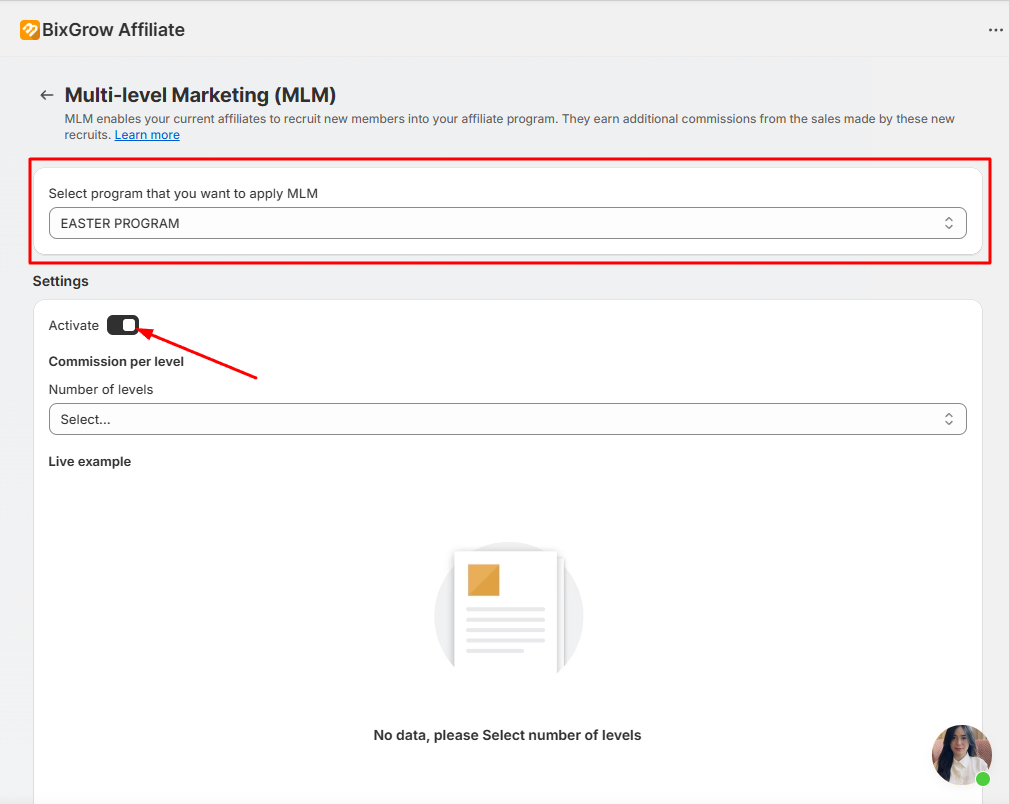
Navigate to **Extra functions >** **Multi-level Marketing (MLM)**.
Choose the program that you want to set up MLM, then click the **Activate** button to start set up MLM for the selected program.
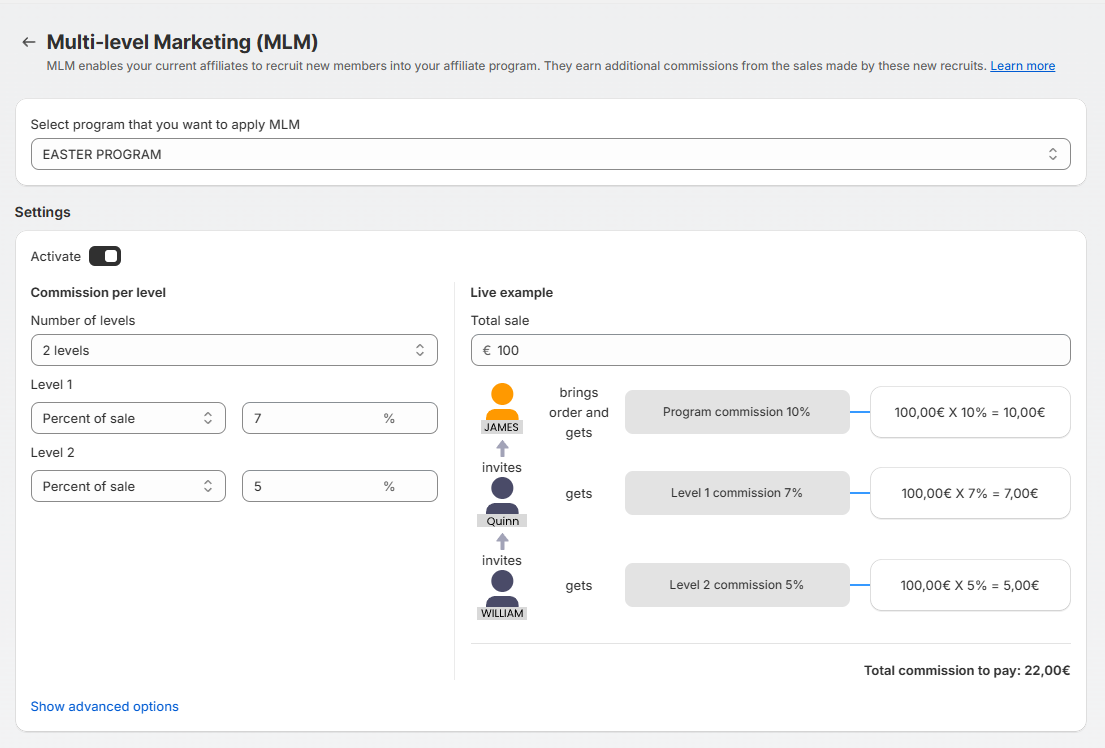
Configure the number of levels and the commission rules for each level and see how the MLM will work with the live example.
In the advanced options, you can add a recruitment bonus, set minimum sales required for affiliates to earn network commissions, and assign which program newly invited affiliates will automatically join.
## How affiliates recruit others
After MLM is **activated**, each **Affiliate Dashboard** will have a **network link**.
Affiliates will share their dedicated **network links** to recruit others to join your program. When they click a **network link** and sign up as new affiliates, they will be considered as **downline affiliates** of a lower level than the link owner. Plus, downline affiliates' performances can be viewed in both the merchant's and the upline affiliates' dashboards.
## Set a parent for an existing affiliate
If you want to set upline affiliates for an existing affiliate, go to **Affiliates** > click the affiliate's name > **Network** > **Set Parent**.
Here, you can fill in the parent affiliate's name or email to search. When you finish, click **Save.**
{% hint style="warning" %}
There can only be **one** direct upline affiliate for each affiliate.
{% endhint %}
## How an MLM commission is displayed
If an order is brought by an affiliate in the MLM network, the order commission for the downline as well as the network commission for the upline will be shown in **Conversions**.
Affiliates can also keep track of their network commissions in the **Network** tab.
#### FAQ
**Q**: **Can I assign an affiliate to a fixed MLM level? For example, I set up A as everyone's level 1 parent affiliate?**
A: No, that is not possible. MLM levels are **NOT** fixed.
**Example**
Here, James is the direct affiliate who makes the sale (earns 10%), while Quinn is his level 1 parent affiliate (earns 5%), and William is his level 2 (earns 3%).
If Quinn makes a sale, she is the direct affiliate (earns 10%), while William is her level 1 parent affiliate (earns 3%), and there's no level 2 as the levels stop there.
**Conclusion**: Affiliates are at a different MLM level for each order, depending on their relationship with the affiliate who makes the sale (direct/parent/child), and the number of levels away from their parent/child affiliate. An affiliate can be the direct seller on an order, an MLM level 1 affiliate on another, and level 2 on another one at the same time.