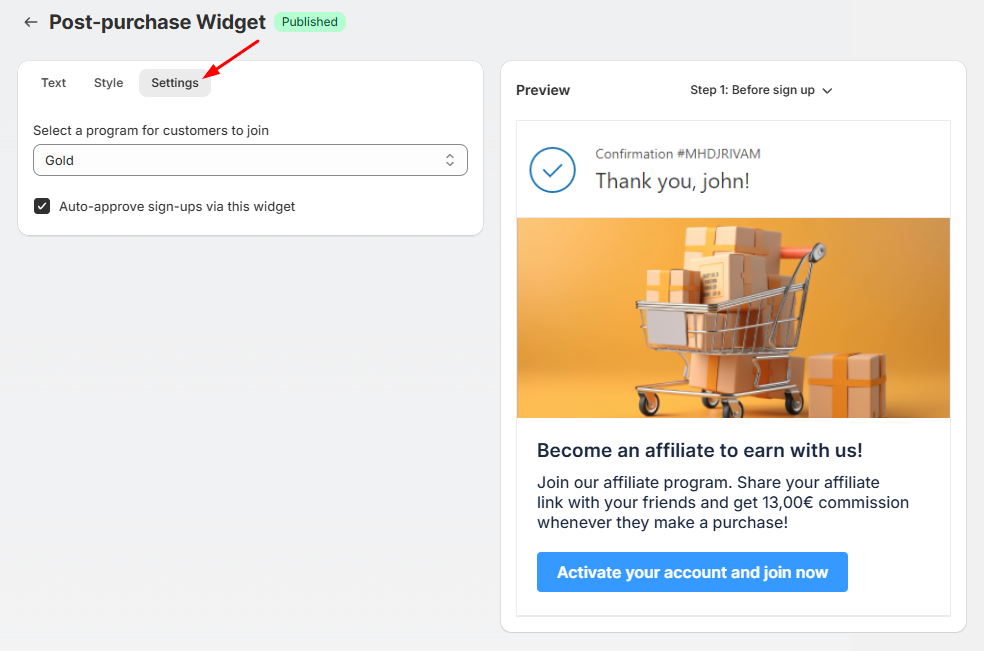
# Post-purchase widget
## How it works
* After an order is placed, the widget appears on the order confirmation page.
* Customers can join your affiliate program with one click.
* Once signed up, their affiliate link is displayed instantly, along with optional social sharing tools.
* You can customize both the appearance and messaging of the widget to match your brand.
## How to display post-purchase widget
Go to **Extra functions** > **Post-purchase widget**
To set up the post-purchase widget, turn on **Publish your widget,** then customize the content shown before and after sign-up, including headlines, descriptions, button text, affiliate link labels, and social sharing options.
Adjust the widget’s appearance by uploading a promotional banner if needed, and configure the settings by selecting the affiliate program and enabling auto-approval if desired.
Finally, review and save your changes.