> For the complete documentation index, see [llms.txt](https://docs.bixgrow.com/llms.txt). Markdown versions of documentation pages are available by appending `.md` to page URLs; this page is available as [Markdown](https://docs.bixgrow.com/conversions/add-approve-deny-a-conversion/adjustments-for-returns-and-refunds.md).
# Returns/Refunded/Cancelled orders
When referral orders are returned or refunded, affiliate commissions are automatically recalculated based on the refunded items.
{% hint style="info" %}
Since BixGrow calculates commission based on individual products, refunds must be processed by product, not as a lump sum. This allows the app to detect exactly which items were refunded and automatically adjust the commission.
{% endhint %}
## How to process a refund correctly
Go to the refund page and enter the quantity for each item being refunded. After entering the quantity, the refund amount will be shown automatically.
Click the **Refund** button to complete the refund.
Go to the **Conversions** tab and view the order details to confirm the refund was reflected correctly.
{% hint style="warning" %}
**DO NOT** enter a lump sum refund amount. The app has no way to determine which products that amount applies to, so the commission won't be adjusted correctly
{% endhint %}
## Refunds before commission payment
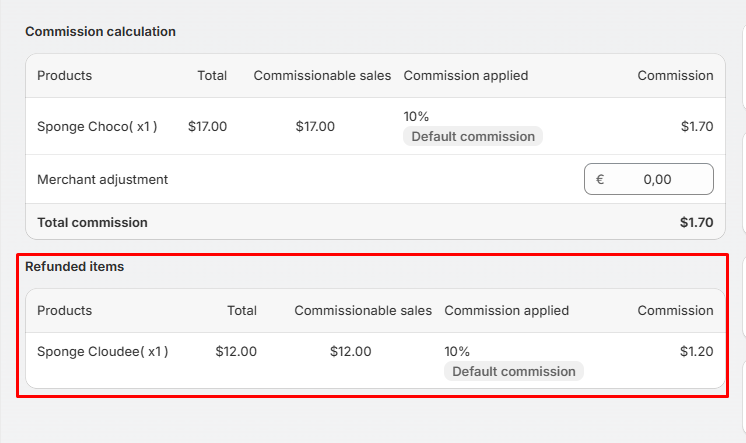
BixGrow will reverse the previous commission calculations and deduct commissions based on the product(s) refunded.
* If only some selected items in the order were refunded and not all, the affiliate will still receive a partial commission.
* If all items in the order were refunded, the affiliate will not receive any commission for that order at all.
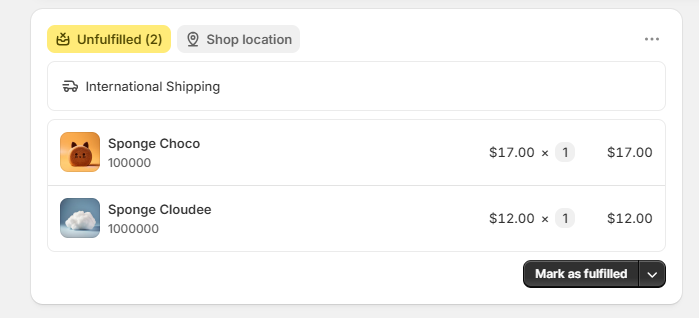
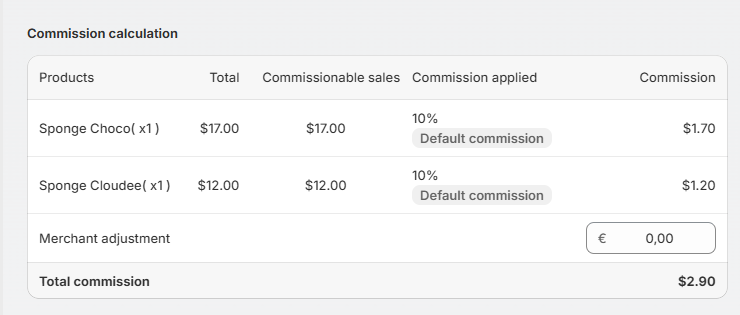
> For example, a customer placed a referral order containing 2 items through an affiliate link, and the commission was recorded in the app.
> After a few days, 1 of those items were refunded, BixGrow tracks this change and updates the referral order details accordingly:
{% hint style="info" %}
It’s recommended to avoid paying affiliates immediately and instead wait for a short period after the order is placed (by [**setting referral orders to be auto-approved after a specified day**](https://docs.bixgrow.com/conversions/add-approve-deny-a-conversion#approve-orders-automatically), for example, 15 days, 30 days..etc).
{% endhint %}
## Refunds after commission payment
If a commission has already been paid to an affiliate before a refund is issued, BixGrow will still track the refund status. In this case, the app automatically creates a new record with a negative commission value, equal to the refunded amount. This negative amount will be deducted from the affiliate’s future total commission, ensuring payouts remain accurate.
## **Cancel an order**
* If you cancel an order **before** the commission is paid, the order status automatically changes to **Denied**, and the commission amount is reduced to 0.
* If you cancel an order **after** the commission is paid, a negative amount is credited to the affiliate's commission, to be deducted from future payouts.